
Opening independently
Choose the premises, layout, booking and entry systems, suppliers and support arrangements yourself. Bring the address, floor plan and equipment list to the relevant local authority before committing to a lease or fit-out.
Before opening a self-service kids café, decide how the space will be used, check the site and applicable requirements, then separate the startup funding from monthly operating costs. Automated entry and payment still leave cleaning, visitor guidance and incident response to plan. Review those decisions before choosing experience equipment.
SunnyLabs supplies Wonder Bricks experience equipment and content. This guide separates decisions about opening the whole venue from our equipment quote. The official procedural sources below concern venues in Korea.
Planning guide by SunnyLabs · reviewed October 25, 2026
Official Wonder Bricks demonstration: a colored Kiki drawing and the resulting avatar in actual game play.
Watch on the official YouTube channelChoose the premises, layout, booking and entry systems, suppliers and support arrangements yourself. Bring the address, floor plan and equipment list to the relevant local authority before committing to a lease or fit-out.
Compare the disclosure document with the written quote and contract: franchise fees, equipment, construction, recurring charges and support. A brand average is not a forecast for your site.
Start with the current route, unused area, displays and staff duties. Confirm the new equipment, installation and content costs separately from the venue budget you already operate.
There is no single equipment price that covers a whole opening. Fill in the premises, fit-out and service quotes for your site, and keep refundable deposits separate from spending. Leave an unquoted item blank rather than treating it as free.
Startup funding = deposits and lease-entry payments + upfront spending + operating cash reserve
Record the lease deposit and any lease-entry payment separately, with return and payment terms from the actual contract.
List construction, power and network work, play equipment, booking/entry/payment systems, installation and any franchise or opening charges. Compare quantities, tax and exclusions in written quotes.
Separate rent, subscriptions and recurring staffing or cleaning costs from payment fees and supplies that change with each booking. Include the value of work you will do yourself.
Choose the cash reserve for your expected opening period and payment schedule. Do not assume full bookings from the first month, or count a refundable deposit as available operating cash.
Compare experience software, hardware rental, installation and ongoing costs separately. The software prices below include VAT; hardware rental is agreed separately. Budget for premises, interiors, reservations and entry management outside the equipment quote.
Enter your own estimates for one consistent booking unit. The calculator leaves the values blank and calculates only from the costs and price you enter.
Monthly break-even bookings = monthly fixed costs ÷ (revenue per booking − variable costs per booking), rounded up to a whole booking.
This estimates break-even for the entered costs, not demand, profit or investment payback. Compare the result with the bookings your available slots could accommodate. Values are calculated in this page and are not sent or saved.
Calculation method · U.S. Small Business AdministrationRequirements depend on the facilities and services you plan to offer. Confirm the applicable procedure with the relevant authority using your address, floor plan, equipment and food-service plans.
| Experience stage | What visitors do | What your team handles |
|---|---|---|
| Template selection, payment and printing | Choose a coloring sheet, pay and collect the printout from the kiosk. | Refill paper, clean and check equipment, and arrange help for payment or printing problems. |
| Avatar experience | Color the sheet, photograph it in Wonder Bricks and view the avatar on the venue screen. | Prepare coloring and capture areas, explain the steps and arrange assistance when needed. |
| Motion games · optional | Use the optional motion games while facing the screen and moving in the camera's view. | Keep the activity area clear, plan visitor supervision and arrange help with game or equipment problems. |
At Ground Planet in Seoul Grand Park, the coloring table and avatar screen form two parts of the same activity. These SunnyLabs field photographs show how the spaces are used; the layout reflects the time of capture.
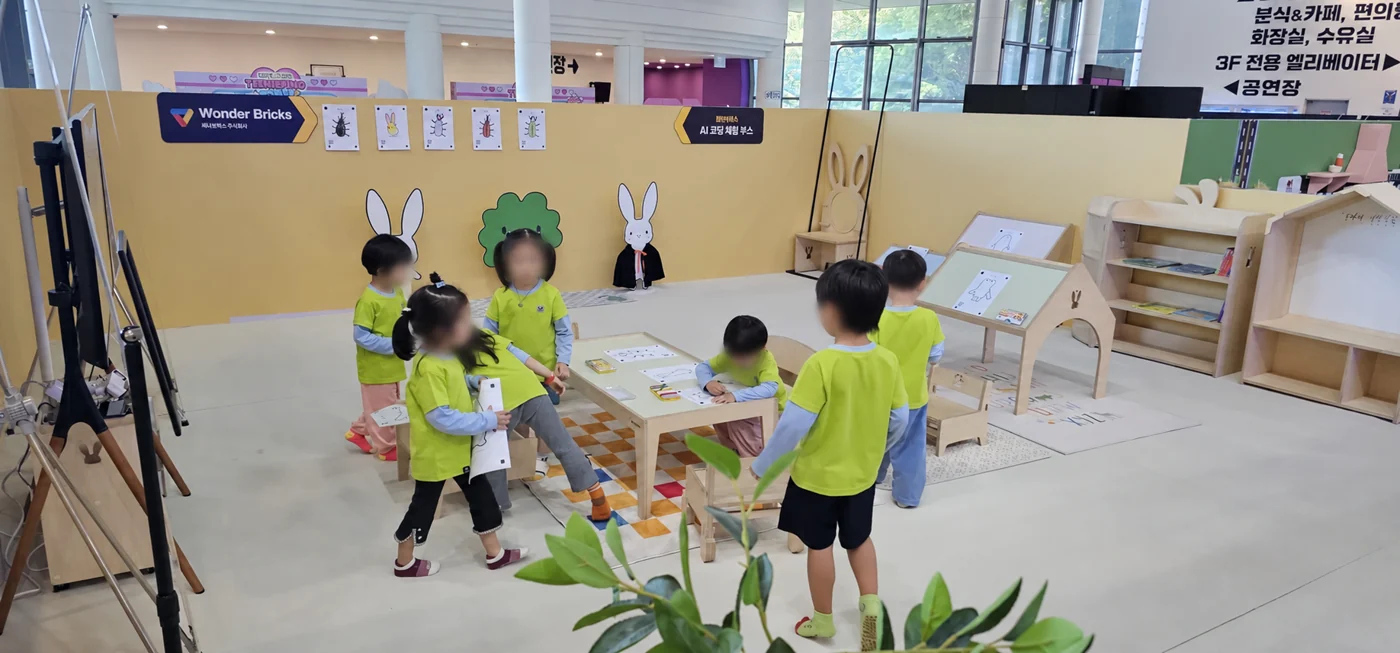
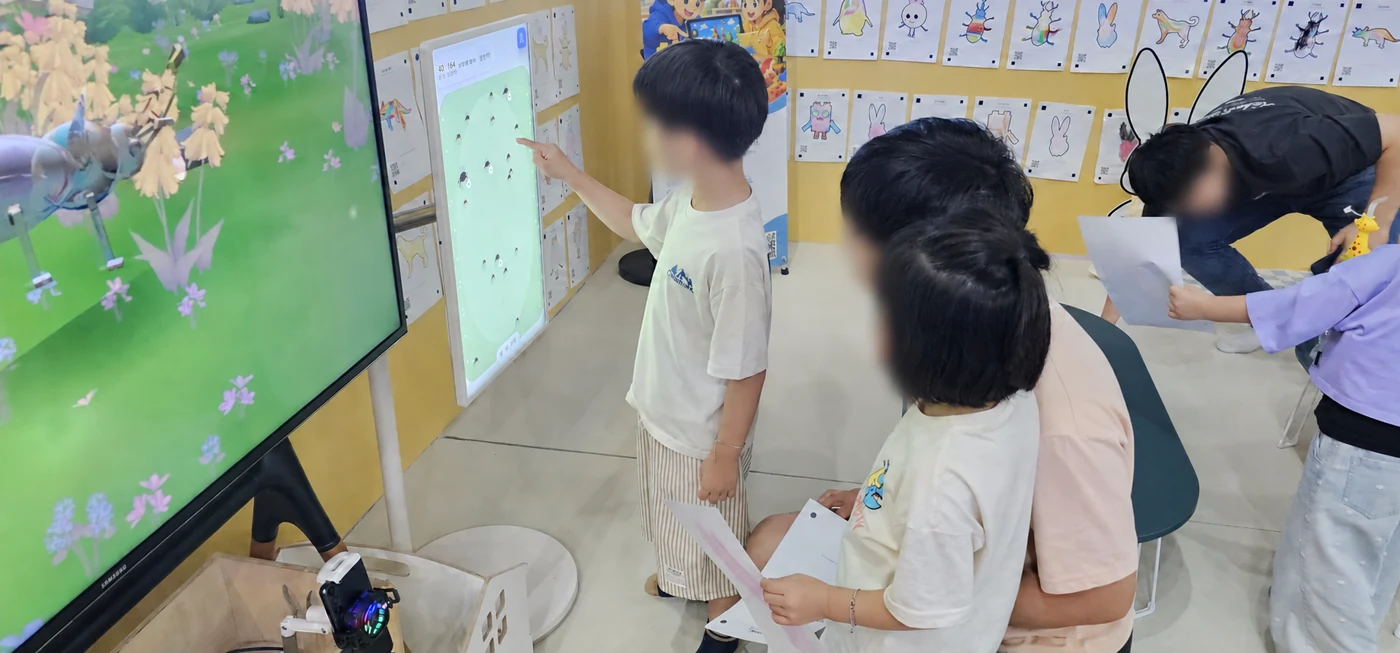
When planning your venue, connect the coloring area, capture position and viewing screen without blocking the route between them. These photographs do not establish unattended operation, staffing requirements or measured waiting times.
The beetle sheet below was loaded into the current Wonder Bricks app on October 25, 2026. Its blue head and colored body appear in the resulting 3D avatar. This app demonstration is separate from the field photographs above.
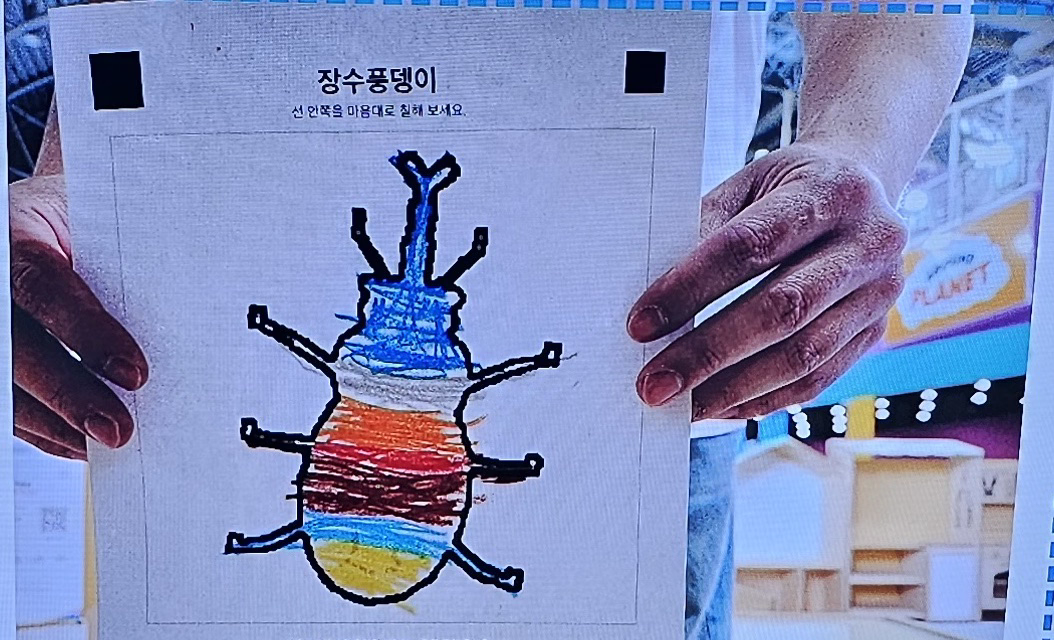
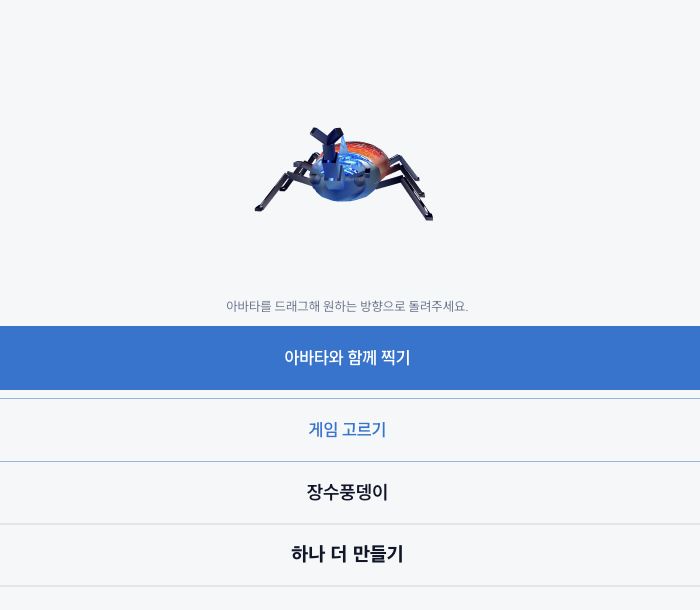
This Korean-language guide combines actual field photographs and app screens with an explanation of venue tasks. Payment, printing and tidying are explained as procedures; they are not presented as filmed demonstrations.
Proposed dimensions · not site-measured ·
Start with the floor area occupied by the equipment. Then allow room for coloring, image capture, movement, waiting and circulation. The dimensions below come from the shared installation study.
1400 × 750 mm
Width × depth · proposed equipment outline
600 × 800 mm
Width × depth · proposed equipment outline
1.53 m²
This total only covers the floor area under the devices. Coloring, participant movement, waiting, circulation and maintenance need additional space.
Plan a coloring table or seating area, a capture position and an avatar viewing screen. Leave space for visitors to move between them.
Position the phone's rear camera toward participants and leave room to move while watching the TV. The detected outline appears on the TV's game screen. Suitable camera distance and activity space depend on the phone, game and venue.
Packages 01 and 02 use TVs of at least 50 inches. The avatar + motion package supports one or two TVs for the avatar world and motion experience. For a projector setup, confirm projection distance and ambient light at the venue.
Review electrical outlets, internet, the route for bringing in the equipment, cable routing and the room needed for maintenance, along with visitor circulation.
These are unmeasured planning dimensions, not final manufacturing or construction specifications. Device height, fixing method, final dimensions and operating space must be confirmed for the selected equipment and site. The floor area occupied by the devices is not the total space required for the venue.
Review the configurations and costs for each experience, then confirm installation and operating terms during consultation.
Venue equipment costs and visitor coloring-sheet purchases are separate. Confirm tax, equipment inclusions and support terms in the quote.
An equipment quote is one part of a startup budget. Budget separately for premises, interiors, franchising, reservation and entry systems, and venue staffing. These costs cannot be inferred from the equipment price.
What to compare in an installation quote · CSV Plan your purchaseUse the venue inquiry button on this page to tell us about your project. The following details help us review the equipment and installation with you.
Share the venue location, a floor plan or photos of the installation area, and the display or projector specifications you already have.
Tell us whether you want avatar creation alone or an added motion setup, the intended participants and your planned opening or installation date.
Confirm equipment inclusions, installation, content access, recurring charges, support and daily operating responsibilities in the quote and contract.
No. SunnyLabs supplies Wonder Bricks experience equipment and content. Premises, interiors, franchising, reservation and entry management need a separate budget. Ask for the equipment and installation items to be listed in your quote.
Choose the avatar package or avatar + motion package. Both hardware configurations include a payment kiosk and printer. The avatar + motion package uses one or two TVs; the Wonder Bricks app handles both phone rear-camera tracking and motion gameplay.
The kiosk handles sheet selection, payment and printing. Arrange coloring and capture guidance, paper refills, cleaning, equipment checks, visitor supervision and problem response as part of your operating plan.
Share your floor plan or installation-area photos and existing equipment specifications. We review the activity area, power, internet, delivery access and, for projection, the distance and ambient light before agreeing the setup.
See the venue pricing page for software prices and hardware rental information. Tell us your location, preferred experience, existing equipment and planned dates when enquiring.
View configuration prices