
Children’s Day and birthday gifts: choose for your child and your home
Start with what your child already enjoys, then check whether your household can actually use the gift. A drawing set, building set and motion game ask for different space, equipment and help. Price alone does not tell you which will fit.
Published by SunnyLabs Inc. · Updated
Written by SunnyLabs, maker of Wonder Bricks. Selection questions are our editorial advice; product terms below concern the Korean home offer.
Ask about the next time they will play
Ask your child to choose between drawing something of their own, building and taking apart, or moving while watching a game. Then ask who will play together and where the gift will be kept. A parent’s choice can start with that small conversation rather than an age-only ranking. Check each product’s age and small-parts guidance before choosing, and try motion activities with a parent first.
Compare the preparation as well as the play
| Gift type | What to ask | Check at home |
|---|---|---|
| Drawing and craft materials | What would you like to draw or make? | Work surface, storage, consumables and the product’s age guidance. |
| Building sets | Would you enjoy following instructions or inventing something? | Piece size, clear-up and space to keep the finished model. |
| Camera-based motion software | Would you like drawing a character and moving to play? | A suitable phone, stable stand, screen connection, camera view and clear play area. |
These are selection questions, not hands-on ratings of all gift types. LEGO’s official gift hub lets shoppers explore by age, price, interests and occasion; the same kinds of questions can help you narrow your own shortlist.
What a drawing becomes in Wonder Bricks
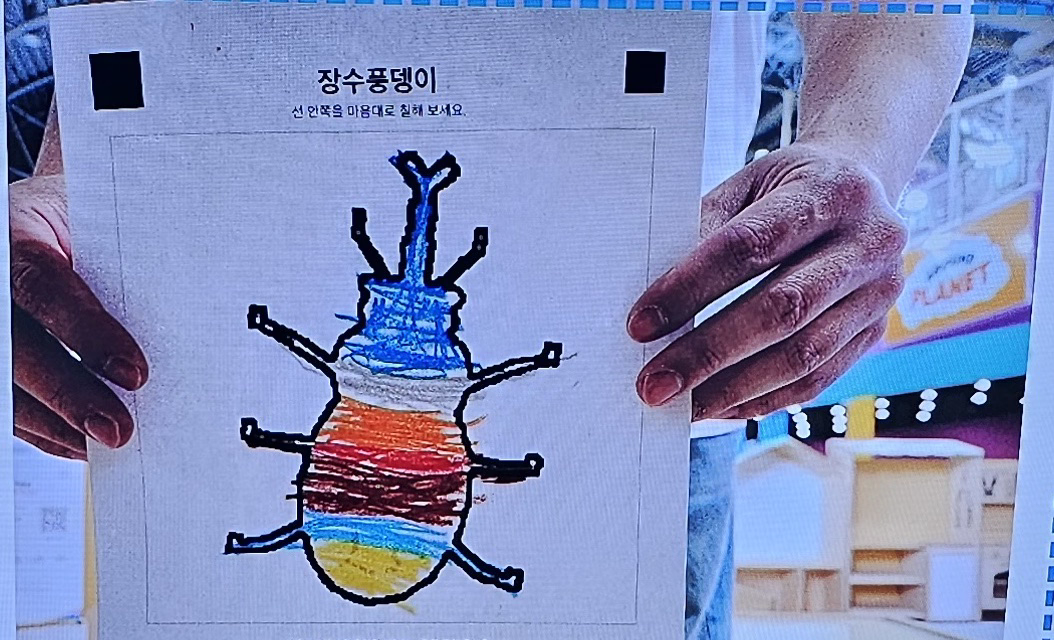
The actual drawing and app result below belong to the same example. Capture a colored drawing in the app, inspect the created avatar, then select an available game. The result is an example, not a promise that every drawing produces the same shape. Drawing and motion play are different steps; an avatar screen does not prove that a phone’s motion setup is ready.

Try the setup before choosing a motion gift
The current home setup uses a phone’s rear camera, a stable tripod and a projector to show the game. Check your exact phone, camera permission and display connection before buying equipment. Leave the camera’s view and your child’s movement area clear of furniture and cables. The illustrated room on the product page is an example layout, not a measured minimum floor area or a filmed home installation. A parent should prepare the equipment and try the activity together first.
Add software, equipment and optional purchases separately
- Base software, one-time purchase
- KRW 59,000
- Additional-game subscription, optional per month
- KRW 29,000
The base includes avatar creation and five fixed motion games; the purchased base games have no time limit. Phone, projector and tripod are separate. The additional-game subscription is optional: stopping it does not remove the purchased base games. AI creation and learning plans are separate from this home motion package. Check the current product page for game names and avatar request/storage limits.
A parent buys; the family uses the registered account
For this home offer, a parent purchases for play together in the same household. Purchase on Naver; after payment is confirmed, a registration link is sent to the phone number on the booking. Submit the purchase on the Wonder Bricks account your family will use, then wait for purchase confirmation and package activation. This is not an instant automatic gift-code delivery service. Check the purchase screen’s current cancellation and refund terms before paying.
See current home package and purchase instructions